ffmpeg_log.txt
FFmpeg’s processing log recorded how the review video was assembled and any messages or errors from that step.
Why it mattered
If the video failed or looked wrong, there was a record to investigate instead of starting from guesswork.
 Image Creation Tool
 Case study by Brendon Hedrick

ICT (Image Creation Tool) was an automation project I designed and led at AddOn Networks (2024–2025), using ChatGPT to generate and revise the code. This case study documents the workflow, development decisions, and results—from missing catalog images to reviewed, published product sets. A repetitive part of my Digital Assets Specialist & Videographer role became a production system our small team could use at a much greater scale.
When I joined AddOn Networks, the team was maintaining a catalog of more than two million product images. I was brought in to help with that manual workload. Three graphic designers were balancing several responsibilities, yet much of their time went into making product images in Photoshop, uploading them, and manually linking them to product records.
About 300 new SKUs arrived each week, each needing eight images—roughly 2,400 new images every week. Designers had to identify new products, photograph the transceivers in a combined photobooth and turntable, then import the photos into Photoshop and apply the correct labels.
My September 2025 self-evaluation recorded manual output at roughly 42–60 images per hour for image creation. Five working days was already the standard turnaround for a new image set when I joined; a batch of 300 new SKUs typically took that long.
One button coordinated the production steps shown below. Start this reconstruction with “Run full demo.”
Fictional parts · local demo data
Label data · CMS / internal files (sample)
Excel VBA turned product records into the CSV jobs that drove Photoshop. The original ICT compared its expected views with the export manifest, making incomplete sets visible.
This browser sample makes one PNG per supported record. Its ZIP uses an illustrative brand → form factor → part number layout and includes the production inputs and a manifest of created, held, and skipped records.
Scan and prepare the catalog to see the file plan.
Prepare the catalog to establish the expected output.
ICT produced the images, the review material, and the records needed to use and check the work. Explore this original output folder from October 2025: select a numbered row or choose a file below.
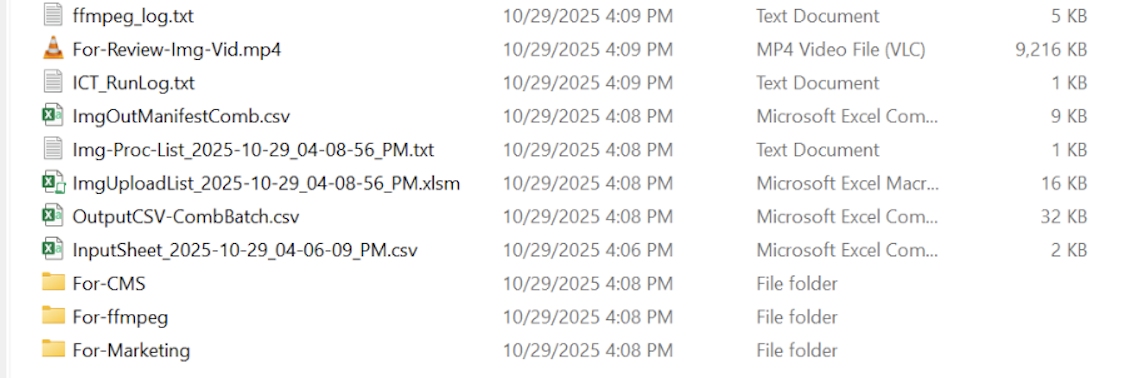
FFmpeg’s processing log recorded how the review video was assembled and any messages or errors from that step.
If the video failed or looked wrong, there was a record to investigate instead of starting from guesswork.
The generated video cycled through the labeled product views. ICT opened it for review after creation.
A designer could inspect brand, text, placement, and clipping across the set before approving upload.
The saved run summary reported products, batches, image count, start time, image-creation time, images per hour, and total elapsed time.
I could compare runs across machines and spot a slowdown against the performance I expected.
The per-batch image manifests were brought together into one record of the exported files.
Large projects needed a consolidated record that could be checked against the complete expected image set.
A deduplicated, sorted part-number list identified products for the downstream image-processing step. Large lists were split to fit that step’s batch limits.
The next system received a prepared list, without someone rebuilding it from folders or a spreadsheet.
This workbook presented the part numbers and image roots, then compared the eight expected views with the export manifest. It displayed created and missing images with a summary of the set.
The team could check completeness in a familiar Excel view and see exactly which outputs needed attention.
The combined production CSV retained the expanded image jobs used to drive Photoshop, bringing the batch inputs back together.
It connected the product data and label instructions to what had been requested from image production.
A timestamped copy preserved the product rows entered or retrieved for the job before they were expanded into image-production instructions.
Inputs could be reloaded for another run or carried through a tool update without entering the job again.
This folder held the consistently named, labeled JPEGs prepared for upload and linking to their product records in the internal CMS.
File names and the expected view sequence connected each image to the correct product.
Numbered image copies gave FFmpeg an ordered sequence to assemble into the review MP4.
The review could be generated automatically in a consistent order across the whole image set.
Marketing copies were filed by brand, product category, form factor, and image root, then copied into the shared image library.
Finished work remained organized and reusable beyond the public product page.
After upload and linking, a separate CMS_Link_Check_….txt recorded image counts against product records. That later check answered a different question: had the images reached the right product?
We photographed each product at 45° intervals, giving ICT eight views for a full rotation. ICT retrieved the blank product photos from the photo network drive, selected the correct label design for the brand, and applied product text from the CMS / internal file system. It kept track of six brands, each with its own label design. After creating the labeled image set, ICT automatically used FFmpeg to assemble a review video. The consistent framing made the product spin in place. For the transceiver sets, the labels stayed centered across the views, so we could look in one place and check the digitally applied labels at speed without opening every image individually.
The demo’s 1–16 fps range reflects how we typically used the review day to day. Once a designer confirmed the review, ICT offered the option to upload to our internal CMS and push live. That started the server synchronization process and delivered the images to the public product page.
Try that final handoff with my eight photographs of PAN-QSFP-AOC-1M-AO, still used on the AddOn Networks product page ↗. This reference set is separate from the fictional images generated above.
1 rotation per second · 8 images per rotation. Slow down to read label text; inspect each angle for the correct brand and any clipping.
Press play to inspect the digitally applied labels, or use Next angle to check placement and text one image at a time.
In the original tool, confirming the review unlocked the upload action.
Interactive simulation. No upload is sent to AddOn Networks or any company system.
Waiting for your review confirmation.
40GBASE-AOC · QSFP+ to QSFP+ · 1 m
The product record exists, but its gallery is still empty.
0 of 8 images available
The product page layout and delivery timing are illustrative. The eight photographs are my original work, produced with ICT; the review video was rebuilt for this website. In the original workflow, the entire loop took almost two hours, including about 30 minutes waiting for server sync.
I built the controls around the way our designers worked: find the missing images, prepare a batch, create and review the assets, then deliver them to the systems that needed them.

Catalog checks, reusable input sheets, and adjustable batches turned product records into image-production jobs.
Manifests, video review, marketing copies, and CMS linking connected the finished images to their next destination.
Local installation, asset checks, and automatic updates kept photos, actions, and supporting tools ready for the next batch.
I spent repeated test runs refining window timing, focus, and the order of results. Progress needed to stay visible, prompts needed to appear in front, and the manifest and review needed to be easy to inspect. Large-scale production required an operator experience the old manual process had never needed.
See the job, its size, and the available actions.
Follow production and file-copy activity.
Compare the planned set with the actual outputs.
Inspect the rotation, then approve the handoff.
The operator journey, summarized from the original workflow.
A finished image was one part of a successful job. I built checks around the handoffs so we could see what had been produced and what had reached the product record.
ICT compared the expected views with Photoshop’s export manifest and listed missing outputs.
Designers reviewed the rotation for the right brand, accurate text, and a clean fit across every angle.
A separate CMS check reported image counts per SKU and product records that could not be matched.
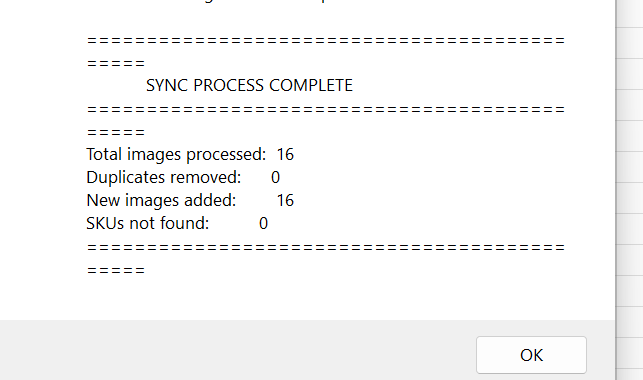
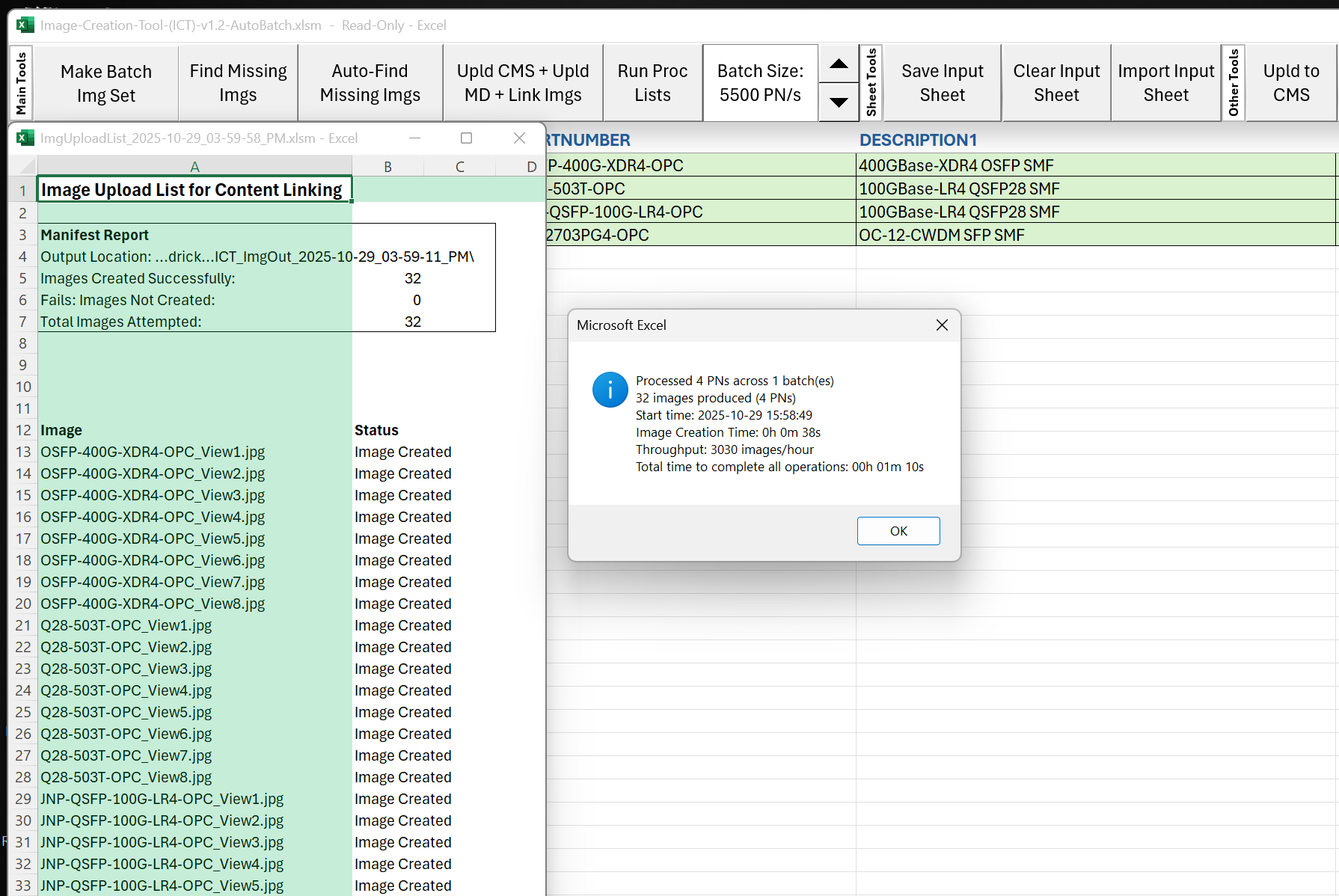
This October 2025 run shows the original input sheet, export manifest, and completion summary together.
Read the original run report ↗I designed ICT around the people using it: knowing what was already running, making use of overnight hours, and keeping each workstation ready for the next job.
When a batch started, ICT could automatically post its part numbers to a Teams chat. Colleagues could see which missing images were being made and expect them soon, helping them avoid starting the same work on another workstation.
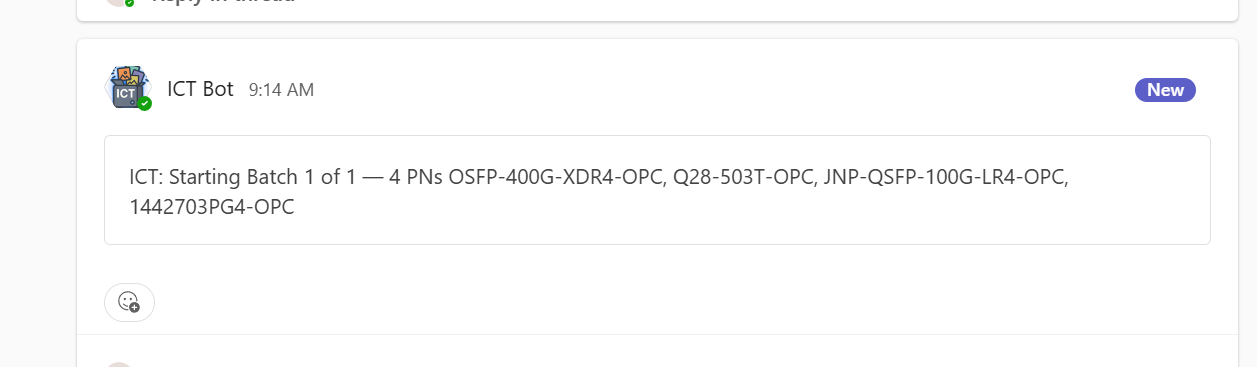
Shared visibility helped us coordinate production and avoid creating the same image sets on different workstations.
I could choose when the missing-image loop ran. With ICT left running, I could schedule it around 2 a.m., then unlock my workstation the next morning to find the review video already playing. Thousands of images could be ready for me to inspect, upload, and send toward the live site before my coffee cooled down.
Scan the catalog and create the missing image sets.
Inspect the labels in the generated video.
Start the handoff to the public product pages.
Production could run overnight; the designer still reviewed the result before publishing.
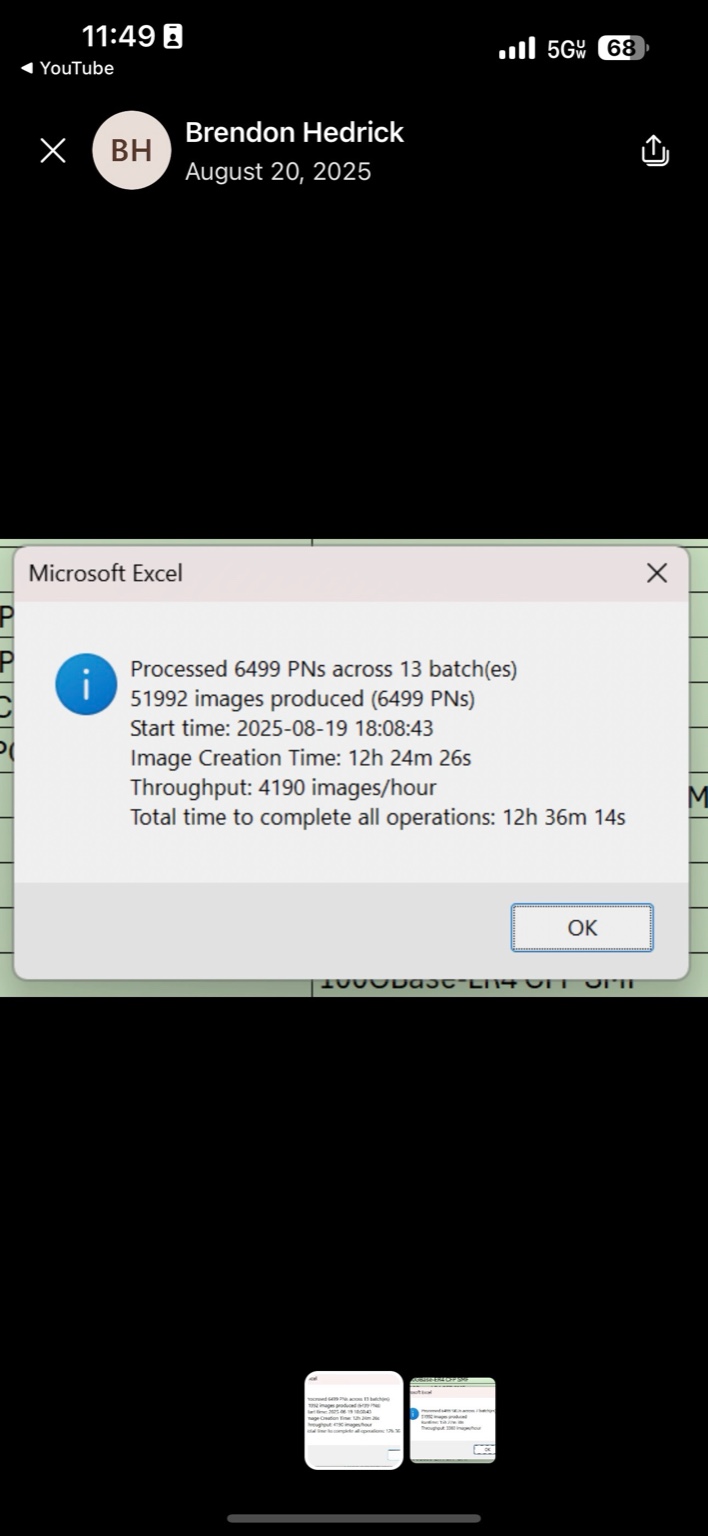
ICT displayed and saved run statistics: products, batches, images, creation time, throughput, and total elapsed time. I used those records to compare machines and recognize when a run was slower than expected.
The August 2025 report records 6,499 part numbers across 13 batches: 12h 24m 26s creating images and 12h 36m 14s for all operations in that run.
Before starting a batch, ICT checked its local assets against the shared repository. Missing files were copied in and updated source photos, masters, actions, and scripts were refreshed automatically. Designers could improve the shared library without asking every operator to copy the changes by hand.
When the tool itself changed, it could save the input sheet, update and relaunch, then reload the job.
At Halo, I sometimes used my i9 and Ultra 9 Dell desktops alongside my Ultra 5 laptop to produce images at the same time. Separate processing lists and tools to combine, deduplicate, and split them helped me keep track of the handoffs.
The archive includes separate desktop and laptop lists, plus a manifest naming the source files gathered into a combined list.
A saved list and its deduplicated version show 171 repeated entries removed before the next handoff.
A separate saved job was divided into numbered processing lists, sized for the next step.
These are separate examples preserved in the working files. I did not benchmark the combined throughput of the machines.
I connected the tools the team already used, then built the rules and controls that made each handoff repeatable. The production workflow grew to include job preparation, batching, distribution, verification, and workstation updates.
Pull parts that are missing product images.
Resolve source-image references, brand and label rules; expand each product into eight view-specific jobs.
Match a source photo to the product specifications, then run artist-built actions to apply the correct brand label and CMS text.
Check label placement, brand, and text across eight angles at 1–16 fps.
Distribute marketing copies, upload the approved set, link it to the product, and check CMS image counts.
Sync the approved assets to the public product page.
ICT prepared the data as well as the images. I built cleanup rules into the handoff from CMS to production, so inconsistent spacing, brand formatting, and punctuation would not derail the job or send text into the wrong label field.
The result was a more dependable path from catalog records to correctly matched artwork, readable labels, and usable output files—with the finished images still checked in the review.
I translated the team’s catalog knowledge into explicit rules. The workflow prioritized mapped image references, then existing image data, with a bill-of-materials lookup as a fallback. Label-family matching could also consult product descriptions when the image identifier was insufficient.
Source reference → product family → brand master → eight view-specific jobs
These matching rules worked alongside the data cleanup above, carrying consistent brand keys and source references through to exports and product linking.
Configurable batches divided large input lists into manageable runs and brought their outputs back together. The Photoshop script updated a master in memory, applied the artist-built actions, and exported a JPEG, removing the earlier save-and-reopen step for an intermediate PSD. Later revisions loaded only the masters a job needed and managed memory during long runs.
My i9 and Ultra 9 desktops reached about 4,200 images per hour per machine; my Ultra 5 laptop ran close to 3,000. I divided large image loads across the two desktops and the laptop, using saved inputs and output records to keep track of the work. Recovered files include separate desktop and laptop processing lists, a manifest of contributing lists, a deduplication helper, and numbered split lists.
My first desktop was a Dell XPS 8960 with an Intel Core i9-14900K, an NVIDIA GeForce RTX 4070 Ti Super, and 64 GB of RAM. I needed more capacity, so I added a Dell Tower Plus EBT2250 with an Intel Core Ultra 9 285K, an RTX 4090, and 64 GB of RAM. The two towers looked identical sitting side by side.
Starting from the shared drive, ICT set up its local working environment: baseline JPEGs, Photoshop masters, actions, scripts, supporting tools, and a desktop shortcut. Before production, it refreshed that asset library with Robocopy and file-update checks, restoring missing local files and bringing changed assets across.
If the workbook itself had changed, ICT could save the input sheet, relaunch the updated version, and reload the job. The graphics team’s changes to base images and actions could reach each workstation through the same update path. Its dedicated Excel session also kept ordinary spreadsheets separate from the tool’s simplified interface.
The interface supported finding missing images, preparing a CSV without running Photoshop, saving and importing job inputs, adjusting batch size and review speed, and running upload and linking steps separately. Scheduled missing-image runs and Teams messages with active part numbers helped the team coordinate when and where work was done.
Automation handled the repeatable work. The graphics team maintained the actions and reviewed the finished labels.
Records are checked for missing images and required fields. Supported jobs are composited into actual 1600 × 1200 PNGs. The export contains those images in nested folders, a production-input CSV, and a catalog manifest that includes held records. The fictional catalog, validation rules, synthetic artwork, interface, and output layout were created for this reconstruction. The three image stages use a local sample to demonstrate retrieving a blank photo from the network drive and applying the brand label with CMS / internal file data. The separate rotation review uses my eight actual ICT-produced photographs from the linked AddOn Networks product page. Its playable MP4 was assembled with FFmpeg for this website. The CMS upload, server sync, and product page transition are simulated locally; no company system is contacted.
The original ICT connected SQL catalog data, Excel VBA job preparation, JavaScript-controlled Photoshop production, FFmpeg review, asset distribution, and CMS publishing. It also included batch controls, source-data rules, local asset updates, export manifests, and checks around CMS linking. I designed the system and directed its development, using ChatGPT to generate and revise the automation code through repeated testing and correction. The original interface, Teams message, and run-report screenshots are preserved from my development archive. They document specific examples, including the 51,992-image production run and the separate 32-image manifest with zero failures. The interactive demo demonstrates the operating concept independently of the original application and company systems.
After several months doing the work manually, I started calling it “robot work”: the same Photoshop menus and spreadsheet steps, repeated for each new part. Knowing the process firsthand let me see where automation could make a difference.
I had no formal coding background. My first experiment used ChatGPT to generate Excel VBA for the CSV files we had been preparing by hand to drive Photoshop. That first working step gave me a way to turn production knowledge into software.
I developed ICT independently in 2024–2025. ChatGPT generated and revised the automation code under my direction. I defined the requirements, designed the connections, tested the outputs, and brought failures back for correction. Each working piece became part of the next, until “Find and Make Missing Imgs” could coordinate the production loop from Excel.
This was a self-initiated development effort. The subscription supplied coding assistance; I supplied the production knowledge, system design, testing, and sustained work that made the pieces function together.
The largest project I recall involved roughly 1.2 million images. I tested it across successive weekends until the manifest showed a complete result all the way through.
I translated the production requirements into rules: the right source photo, brand, specifications, eight views, and destination. I designed separate checks for output completeness, visual quality, and CMS linking.
See the quality checks and original result →I specified the file structures, controls, review sequence, and operator feedback. The images, manifests, video, and upload records each had to arrive in a form the next step could use.
Explore the original output files →I extended the workflow to cover asset refresh, scheduled runs, team notifications, and performance records. I kept testing both the output and the experience of running large jobs.
See the coordination and production evidence →“The issue is that the performance of the image output was cut in half.”
My test feedback identified a regression from showing every finished image. I asked for the blocking waits to be removed and questioned the cost of the preview itself.
“it works but the msgbox ends up opening behind the robocopy window.”
I caught the hidden completion prompt and specified the window behavior. Later, I refined when the CMS result should be saved and the operator returned to the main input sheet.
Excerpts from my feedback in the original 2025 ICT development conversations.
AI let me implement more of what I could design. My responsibility was to decide what needed to exist, how the parts should connect, and how to check that the result was correct.
My scripts controlled a library of Photoshop actions hand-built by the graphics artists. Those actions defined how a label fit each product and camera angle. ICT connected that craft to the production system I designed. Once ICT automated production, the artists focused on maintaining that library and updating the actions to keep every fit precise.
The system covered hundreds of different transceivers and DACs, six brands, and thousands of part numbers—each with its own combination of specifications, form factor, and brand artwork.
That self-reported total includes production and repeated test runs; it is not a count of unique published images.
ICT continued to be used after I left.
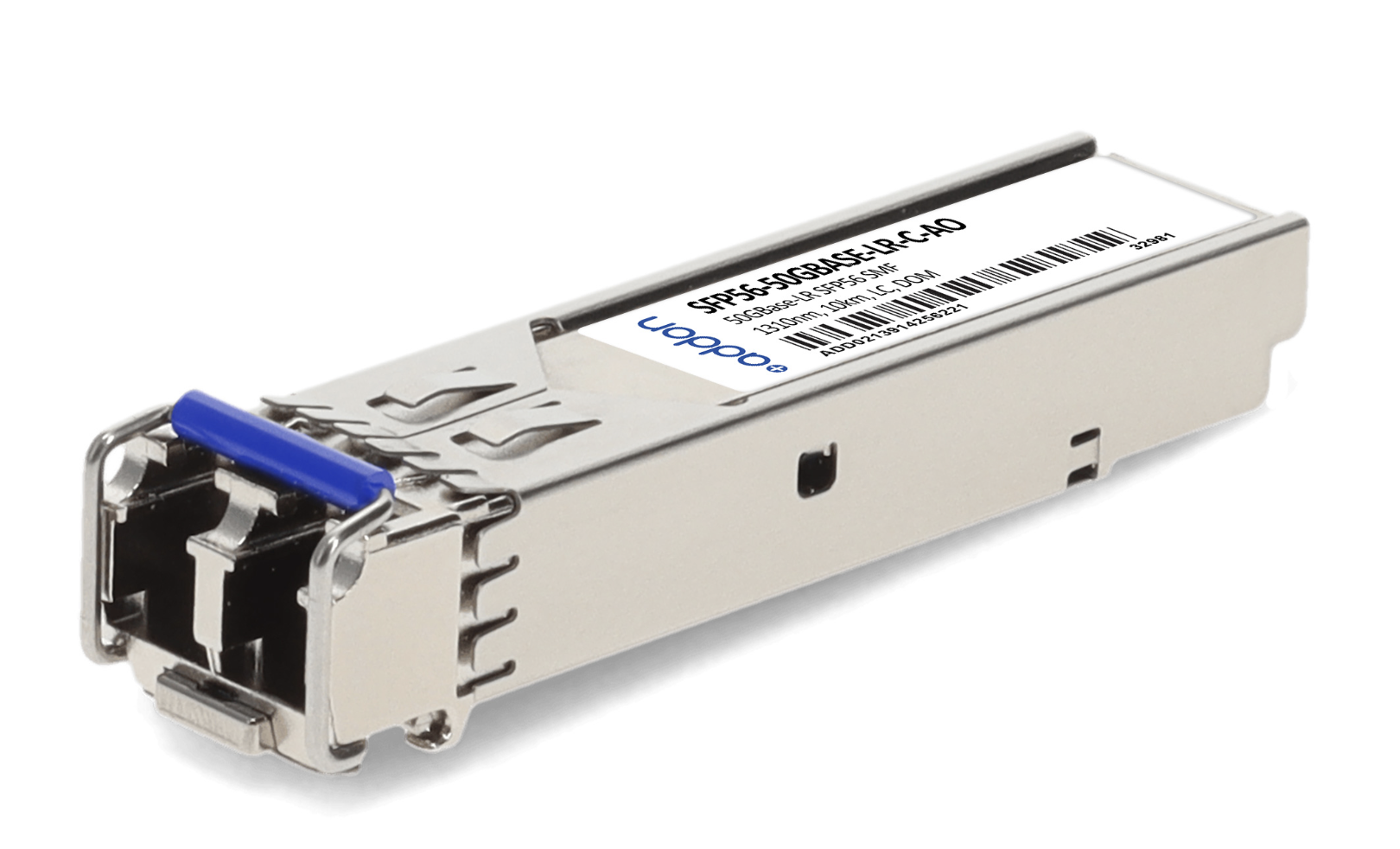
The rounded label is fitted to the product surface and perspective.
View SFP56-50GBASE-LR-C-AO on AddOn Networks ↗A fundamental label redesign for one of our six brands could mean 500,000 new images. ICT made that scale practical and changed how we approached branding and image updates. The largest project I recall involved about 1.2 million images. Explore those scales below.
Move the slider to compare production time for the same batch.
One machine at a time in this comparison. My i9 and Ultra 9 desktops reached about 4,200 images/hour per machine; my Ultra 5 laptop ran close to 3,000. I sometimes ran both desktops and the laptop together; their combined throughput was not benchmarked.
I wanted ICT to give the graphics designers their time and creative energy back. Watching talented people repeat the same mechanical steps, day after day, felt inhumane to me. That conviction kept me working through the failures and difficult problems. Along the way, I fell in love with the process of turning a frustrating routine into a system that worked.
To me, this is what makes AI-assisted development powerful: someone who understands the work can begin changing the conditions of that work. I see it as an early step toward freeing people from a nine-to-five defined by repetition, and giving them more choice over how they spend their time.
ICT is the clearest example of how I connect media production experience with workflow automation. I bring that approach to product marketing and creative teams: understand the media, protect the quality standard, and build a production process the team can use.
I use AI-assisted development to connect existing tools, automate repetitive work, and help teams get more done without sacrificing quality.